<?xml version="1.0" encoding="utf-8"?><feed xmlns="http://www.w3.org/2005/Atom" xml:lang="en"><generator uri="https://jekyllrb.com/" version="3.10.0">Jekyll</generator><link href="https://flipperpa.github.io/feed.xml" rel="self" type="application/atom+xml" /><link href="https://flipperpa.github.io/" rel="alternate" type="text/html" hreflang="en" /><updated>2026-10-31T19:35:57+00:00</updated><id>https://flipperpa.github.io/feed.xml</id><title type="html">PyPhilly: Timothy Allen</title><subtitle>PyPhilly is the website of Tim Allen, a web developer living in Philadelphia. Tim writes about Python, Django, Wagtail, and open source.</subtitle><author><name>Timothy Allen</name></author><entry><title type="html">Programmatically Modifying a Wagtail StreamField</title><link href="https://flipperpa.github.io/programmatically-modifying-a-wagtail-streamfield/" rel="alternate" type="text/html" title="Programmatically Modifying a Wagtail StreamField" /><published>2022-08-30T11:38:00+00:00</published><updated>2022-08-30T11:38:00+00:00</updated><id>https://flipperpa.github.io/programmatically-modifying-a-wagtail-streamfield</id><content type="html" xml:base="https://flipperpa.github.io/programmatically-modifying-a-wagtail-streamfield/"><![CDATA[<p>Modifying a <code class="language-plaintext highlighter-rouge">StreamField</code> programmatically requires a formula of several steps:</p>

<ol>
  <li>First, we load the specific Wagtail page instance we want to modify;</li>
  <li>Then, we load a Python structure (a list of dictionaries) representing the <code class="language-plaintext highlighter-rouge">StreamField</code> contents;</li>
  <li>Next, we modify the structure to add, change, or remove the <code class="language-plaintext highlighter-rouge">StreamField</code> elements programmatically;</li>
  <li>Finally, we save the changes as a new revision.</li>
</ol>

<p>Let’s assume we have the following <code class="language-plaintext highlighter-rouge">Page</code> model made up of a <code class="language-plaintext highlighter-rouge">StreamField</code>:</p>

<div class="language-python highlighter-rouge"><div class="highlight"><pre class="highlight"><code><span class="c1"># my_app/models.py
</span><span class="kn">from</span> <span class="nn">wagtail.core.blocks</span> <span class="kn">import</span> <span class="n">RichTextBlock</span><span class="p">,</span> <span class="n">TextBlock</span>
<span class="kn">from</span> <span class="nn">wagtail.core.fields</span> <span class="kn">import</span> <span class="n">StreamField</span>
<span class="kn">from</span> <span class="nn">wagtail.core.models</span> <span class="kn">import</span> <span class="n">Page</span>
<span class="kn">from</span> <span class="nn">wagtail.documents.blocks</span> <span class="kn">import</span> <span class="n">DocumentChooserBlock</span><span class="p">,</span> <span class="n">StreamBlock</span>
<span class="kn">from</span> <span class="nn">wagtail.embeds.blocks</span> <span class="kn">import</span> <span class="n">EmbedBlock</span>


<span class="k">class</span> <span class="nc">ContentStreamBlock</span><span class="p">(</span><span class="n">StreamBlock</span><span class="p">):</span>
    <span class="n">heading</span> <span class="o">=</span> <span class="n">TextBlock</span><span class="p">()</span>
    <span class="n">paragraph</span> <span class="o">=</span> <span class="n">RichTextField</span><span class="p">(</span><span class="n">features</span><span class="o">=</span><span class="p">[</span><span class="s">'h2'</span><span class="p">,</span> <span class="s">'h3'</span><span class="p">,</span> <span class="s">'bold'</span><span class="p">,</span> <span class="s">'italic'</span><span class="p">,</span> <span class="s">'link'</span><span class="p">])</span>
    <span class="n">document</span> <span class="o">=</span> <span class="n">DocumentChooserBlock</span><span class="p">()</span>
    <span class="n">embed</span> <span class="o">=</span> <span class="n">EmbedBlock</span><span class="p">()</span>


<span class="k">class</span> <span class="nc">MyPage</span><span class="p">(</span><span class="n">Page</span><span class="p">):</span>
    <span class="n">body</span> <span class="o">=</span> <span class="n">StreamField</span><span class="p">(</span><span class="n">ContentStreamBlock</span><span class="p">())</span>

    <span class="n">content_panels</span> <span class="o">=</span> <span class="n">Page</span><span class="p">.</span><span class="n">content_panels</span> <span class="o">+</span> <span class="p">[</span><span class="n">StreamFieldPanel</span><span class="p">(</span><span class="s">'body'</span><span class="p">)]</span>
</code></pre></div></div>

<p>Here’s an example of how we could loop through the instances of <code class="language-plaintext highlighter-rouge">MyPage</code>, programmatically removing any <code class="language-plaintext highlighter-rouge">embed</code> we encounter.</p>

<div class="language-python highlighter-rouge"><div class="highlight"><pre class="highlight"><code><span class="kn">from</span> <span class="nn">json</span> <span class="kn">import</span> <span class="n">dumps</span>

<span class="kn">from</span> <span class="nn">django.utils</span> <span class="kn">import</span> <span class="n">timezone</span>

<span class="kn">from</span> <span class="nn">wagtail.core.fields</span> <span class="kn">import</span> <span class="n">StreamField</span>

<span class="kn">from</span> <span class="nn">my_app.models</span> <span class="kn">import</span> <span class="n">ContentStreamBlock</span><span class="p">,</span> <span class="n">MyPage</span>


<span class="k">for</span> <span class="n">my_page</span> <span class="ow">in</span> <span class="n">MyPage</span><span class="p">.</span><span class="n">objects</span><span class="p">.</span><span class="nb">all</span><span class="p">():</span>
    <span class="c1"># Create a blank list for the revised StreamField
</span>    <span class="n">new_streamfield_struct</span> <span class="o">=</span> <span class="p">[]</span>

    <span class="c1"># Grab the existing StreamField as a list of dicts
</span>    <span class="n">streamfield_struct</span> <span class="o">=</span> <span class="n">my_page</span><span class="p">.</span><span class="n">specific</span><span class="p">.</span><span class="n">body</span><span class="p">.</span><span class="n">get_prep_value</span><span class="p">()</span>

    <span class="c1"># Loop through the StreamField elements, drop any embeds
</span>    <span class="k">for</span> <span class="n">index</span><span class="p">,</span> <span class="n">element</span> <span class="ow">in</span> <span class="nb">enumerate</span><span class="p">(</span><span class="n">streamfield_struct</span><span class="p">):</span>
        <span class="k">if</span> <span class="n">element</span><span class="p">[</span><span class="s">"type"</span><span class="p">]</span> <span class="o">!=</span> <span class="s">"embed"</span><span class="p">:</span>
            <span class="n">new_streamfield_struct</span><span class="p">.</span><span class="n">append</span><span class="p">(</span><span class="n">element</span><span class="p">)</span>

    <span class="c1"># Convert the new_streamfield_struct back to a StreamField and save a new revision
</span>    <span class="n">my_page</span><span class="p">.</span><span class="n">body</span> <span class="o">=</span> <span class="n">StreamField</span><span class="p">(</span>
        <span class="n">ContentStreamBlock</span><span class="p">()).</span><span class="n">to_python</span><span class="p">(</span><span class="n">dumps</span><span class="p">(</span><span class="n">new_streamfield_struct</span><span class="p">)</span>
    <span class="p">)</span>
    <span class="n">revision</span> <span class="o">=</span> <span class="n">my_page</span><span class="p">.</span><span class="n">save_revision</span><span class="p">(</span><span class="n">submitted_for_moderation</span><span class="o">=</span><span class="bp">False</span><span class="p">)</span>
    <span class="n">revision</span><span class="p">.</span><span class="n">publish</span><span class="p">()</span>
    <span class="n">my_page</span><span class="p">.</span><span class="n">live_revision</span> <span class="o">=</span> <span class="n">revision</span>
    <span class="n">my_page</span><span class="p">.</span><span class="n">live_revision_id</span> <span class="o">=</span> <span class="n">revision</span><span class="p">.</span><span class="nb">id</span>
    <span class="n">my_page</span><span class="p">.</span><span class="n">last_revision_created_at</span> <span class="o">=</span> <span class="n">timezone</span><span class="p">.</span><span class="n">now</span><span class="p">()</span>
    <span class="n">my_page</span><span class="p">.</span><span class="n">save</span><span class="p">()</span>
    <span class="k">print</span><span class="p">(</span><span class="sa">f</span><span class="s">"Saved new page with page_id </span><span class="si">{</span><span class="n">my_page</span><span class="p">.</span><span class="nb">id</span><span class="si">}</span><span class="s">."</span><span class="p">)</span>
</code></pre></div></div>

<p>That’s the formula! You can do whatever you like in the part of the code where I’ve dropped <code class="language-plaintext highlighter-rouge">embed</code> elements as an example, just make sure to carefully verify and validate your <code class="language-plaintext highlighter-rouge">StreamField</code> structure. It is worth examining your structure in detail so you understand how it is stored as <code class="language-plaintext highlighter-rouge">JSON</code> in the database, and how to manipulate it as a Python structure.</p>]]></content><author><name>Timothy Allen</name></author><category term="Python" /><category term="Django" /><category term="How-To" /><summary type="html"><![CDATA[StreamFields are one of the most powerful features of Wagtail, allowing content creators to use various blocks to assemble content. There may be times a developer wants to modify them programmatically; here's a formula to do so.]]></summary></entry><entry><title type="html">Hiring? Take Five Minutes and Watch This</title><link href="https://flipperpa.github.io/hiring-take-five-minutes-and-watch-this/" rel="alternate" type="text/html" title="Hiring? Take Five Minutes and Watch This" /><published>2022-06-24T14:15:00+00:00</published><updated>2022-06-24T14:15:00+00:00</updated><id>https://flipperpa.github.io/hiring-take-five-minutes-and-watch-this</id><content type="html" xml:base="https://flipperpa.github.io/hiring-take-five-minutes-and-watch-this/"><![CDATA[<p>This lightning talk by <a href="https://github.com/kylegibson">Kyle Gibson</a> is one of the best I’ve seen; it changed the way I approach hiring. It is worth a watch whenever you are about to enter the process of hiring someone. Remember, your involvement in the hiring process is the most important thing you will do at any job you have.</p>

<div class="video">
  <iframe src="https://www.youtube-nocookie.com/embed/L42AX0HrRFg?start=636" title="DjangoCon US 2018 - Lightning Talks Day 2" loading="lazy" allow="accelerometer; clipboard-write; encrypted-media; gyroscope; picture-in-picture; fullscreen" referrerpolicy="strict-origin-when-cross-origin" allowfullscreen=""></iframe>
</div>]]></content><author><name>Timothy Allen</name></author><category term="How-To" /><category term="Conferences &amp; Meetups" /><summary type="html"><![CDATA[We have an open position on our team where I'll be involved in the hiring process. I watch this video as a reminder.]]></summary></entry><entry><title type="html">What is the Metaverse?</title><link href="https://flipperpa.github.io/what-is-the-metaverse/" rel="alternate" type="text/html" title="What is the Metaverse?" /><published>2021-11-09T22:33:00+00:00</published><updated>2021-11-09T22:33:00+00:00</updated><id>https://flipperpa.github.io/what-is-the-metaverse</id><content type="html" xml:base="https://flipperpa.github.io/what-is-the-metaverse/"><![CDATA[<h2 id="first-a-quick-answer">First, A Quick Answer</h2>

<p>So what is the metaverse? A clinical answer to the question might be, “a persistent, three-dimensional virtual space in which people can interact via avatars in a plethora of interesting ways.” The idealist in me would insist that the metaverse should be, “the ultimate blank canvas for our dreams, a place where people can explore new levels of intellectual curiosity, whimsy, and hopefully, mutual understanding on a level playing field.”</p>

<h2 id="the-origin-of-the-term-metaverse">The Origin of the Term Metaverse</h2>

<p>I first read the term “metaverse” as a senior in high school. I had been programming computers since I was about six years old, so by this time, I had been tinkering with code and hardware for over a decade. I was beginning to dream of a future where the internet would be part of our daily lives. In his 2006 book, <a href="https://smile.amazon.com/Techno-Cultural-Evolution-Cycles-Creation-Conflict/dp/1574889664">Techno-Cultural Evolution: Cycles of Creation and Conflict</a>, William McDonald Wallace argues that human evolution has had three major spikes after crucial inventions have come to be:</p>

<ul>
  <li>the first, after we became an agricultural society, rather than one that hunted and gathered;</li>
  <li>the second, after the invention of the printing press;</li>
  <li>and now, the third, where we have flattened communication across the planet with the internet.</li>
</ul>

<p>It is a compelling thought and could explain the growing pains humanity has been experiencing the past two decades. Humans aren’t huge fans of change, and the internet and globalization have changed everything. The rate of accelerated change is affecting even the most ardent techies among us, and it is something humanity will continue to wrestle with for generations to come.</p>

<p>Before I was a teenager, I loved playing with computers because it was the next logical step beyond Lego, but by high school, I had begun to understand that everything was about to change: EVERYTHING. I had started using my modem to network with people around Philadelphia, and discovered multi-node BBS’s, where we could chat and play games together in virtual spaces, including a game called Infinity Complex, which sucked down many hours of my friends and my time. I graduated from high school in June 1992, the same month that Neal Stephenson released his seminal cyberpunk novel, <a href="https://smile.amazon.com/Snow-Crash-Neal-Stephenson/dp/0553380958/">Snow Crash</a>. This was the book in which he coined the term “metaverse”, to describe a persistent three-dimension space experienced as a city, called “the Street.”</p>

<h2 id="more-of-my-background">More of My Background</h2>

<p>I read Snow Crash over the summer of 1992, and it fueled my dreams, inspiring me to create an individualized major at the University of Pennsylvania. We were making our own worlds on the internet, including PennMOO, and all-text-based chat world on campus. I graduated in 1996 with a degree combining Computer Science, Psychology, Cognitive Science, and Philosophy. Throughout college, I was an early adopter of anything and everything to do with virtual reality. I was one of the early adopters of ActiveWorlds (<a href="http://web.archive.org/web/20040615120857/http://arcworld.sprawl-vr.com/awcit.html">you can search for FlipperPA on their early citizen list!</a>), Worlds.NET, Virtual Places, and many others. I spent countless hours online. I am friends to this day with some of the wonderful people I met through these virtual worlds; the bonds created are real, and the friendships have lasted for decades.</p>

<p>I wrote my senior thesis on using computers alongside the human mind for better understanding, which now sounds obvious, but was novel at the time. By the end of college, I was dreaming of this elusive “metaverse” coming to fruition. I wanted it to be a better way forward for humanity.</p>

<h2 id="my-obsessions-and-addictions">My Obsessions and Addictions</h2>

<p>I should mention that I’m an addict. I can get obsessive about things. I have always been full-on into technology my entire life, but by the end of college, I was also an alcoholic. With the demand for technology professionals never ceasing, the two tended to go hand-in-hand. Idiotic catchphrases like “work hard, play hard” gave me the excuse I wanted to continue to allow my behavior to slide. I’m now recovered, but for much of what you’re about to read, I was a functional active alcoholic.</p>

<h2 id="the-second-life-years">The Second Life Years</h2>

<p>I wasn’t the only person inspired by this novel: Philip Rosedale cites it as his primary inspiration for founding Linden Lab. Linden Lab was the company that created the virtual world Second Life - who were largely the subject of the last wave of hype about virtual worlds, circa 2005 through 2008. I joined Second Life almost exactly 18 years ago at the time of this writing: November 14th, 2003. The Chief Technology Officer of Linden Lab, Cory Ondrejka, would go on to become Vice President of Engineering for Facebook, and is largely responsible for convincing Mark Zuckerberg to purchase Oculus. Cory Ondrejka had taken the bold step of announcing that any creation in Second Life would remain the intellectual property of the creator. I saw the article on Slashdot and created my account minutes later. A week later, I bought a new laptop with a powerful graphics card, and it was off to the races.</p>

<p>It wasn’t long before I was the first person to buy an entire mainland simulator - a virtual section of land, 256 meters by 256 meters, or about 16 acres. It was called Indigo, and I assembled a crew of friends to help build it out. This is where I first experienced the feeling of building my dreams on a blank canvas. It was amazing, and I was immersed. It wasn’t long before I became friends with many of the employees and upper management of Linden Lab, including Philip, Cory, and Robin Harper, the VP of Community Development. They were amazing minds in an amazing startup during a wonderful time.</p>

<p>Second Life got a lot of coverage because of avatars having sex. This always seemed a bit absurd to me. Humans are sexual creatures. Most new technologies are first used, and pushed to their limits, by sex-related industries. People viewing pornography seems to be largely accepted by society. Yet, a virtual world sexual encounter, where there is an actual person on the other end and not a recording, is weird for some reason? That never quite made sense to me. I had a friend in Second Life, charming and hilarious, who was wheelchair-bound. He met his wife through Second Life and told me he would never have had the confidence to meet a woman without it.</p>

<p>Second Life also <a href="https://braintalk.blogs.com/brigadoon/2005/01/more_about_brig.html">made things like Brigadoon possible</a>. Brigadoon was a private area of Second Life, where children with Asperger’s Syndrome could congregate. They could learn social skills by communicating with one another, all from the comfort of their own homes. This was amazingly effective, and an unexpected byproduct of this was, it became an incredible support network for the parents. The Second Life community raised hundreds of thousands of dollars for the American Cancer Society’s Relay for Life in incredibly creative ways. This is just the tip of the iceberg of uplifting stories from the Second Life community.</p>

<p>With a few friends and my former wife, I was a founding member of The Second Life Community Convention, which I organized from 2005 through 2007. 2005’s convention in New York was 150 people; nine months later in San Francisco, we had a second in 2006, with 500 people. In 2007, with the hype cycle in full force, we had over 1,000 people show up in Chicago for SLCC 2007.</p>

<p>During this time, I also started a company on a dare by accident, entirely virtually. It was called SLBoutique, and it was a website where anyone who created content in the virtual world could sell it through a common web portal. Items were delivered in real-time in the virtual world via XML-RPC calls to objects in the virtual world from the web, and payments were made in real time to the sellers. I decided to take it a step further and began selling real-world items - such as computer monitors and video cards - for Second Life’s currency, the Linden dollar. This got me coverage in <a href="https://www.bloomberg.com/news/articles/2006-04-30/its-not-all-fun-and-games">BusinessWeek</a>, <a href="https://www.mtv.com/news/1521239/finally-you-can-buy-something-real-with-play-money/">MTV</a>, <a href="https://www.theguardian.com/technology/gamesblog/2006/jan/23/realgoodsfor">The Guardian</a>, and many other outlets. My former wife and I were featured on MSNBC, CNBC, CNN, and ABC… all over the place. It was a crazy time.</p>

<p>In the era of BitCoin, it is crazy to think that I was the first person to sell real-world items for a virtual currency, and I did it on a drunken dare!</p>

<h2 id="so-what-now">So What Now?</h2>

<p>I consider Cory Ondrejka a friend, but I am saddened that Facebook has gotten involved in virtual worlds and have trouble reconciling that the person who ensured that Second Life residents retained their intellectual property would start the ball rolling for one of the worst companies in the world to dominate virtual reality. I can think of very few people who will be a worse steward of the potential of the metaverse than Mark Zuckerberg.</p>

<p>We have finally reached a point where technology is catching up with our dreams, through products like the Valve Index, HTC Vive, and Oculus, and I’m watching Facebook do what they always do: buy out any potential competitor. They’ve bought Oculus, and released a $300 model which is dominating the marketplace. They are requiring a Facebook account to use it. They have purchased the development company that makes one of my favorite games, Beat Saber.</p>

<p>I wake up every morning and do a 45-minute workout with my virtual reality headset on, and people don’t seem to think it is that weird anymore. I’ve got friends I’ve made through virtual worlds for over 25 years. Just because Mark Zuckerberg puts out a press release doesn’t change what we can do, and I hope we choose more wisely than we have with Facebook. I believe the data show that Trump never becomes President without Facebook, and that 650,000 Americans likely would be alive without Trump putting himself before the country during this pandemic. And yet, Zuckerberg continues to put his algorithm and profits above human life. It is despicable.</p>

<p>The metaverse is theoretical; the metaverse is NOT Facebook’s Meta. The metaverse is a vast potential that no one owns. We can still make the metaverse the place of OUR dreams.</p>]]></content><author><name>Timothy Allen</name></author><category term="Random" /><category term="Virtual Reality" /><summary type="html"><![CDATA[This is a question I've been asked many times since Facebook's decision to rebrand as Meta. The answer is, to borrow phrase from Facebook... "it's complicated."]]></summary></entry><entry><title type="html">Beat Saber Online: It Might Just Be the Friendliest Online Community</title><link href="https://flipperpa.github.io/beat-saber-online-it-might-just-be-friendliest-online-community/" rel="alternate" type="text/html" title="Beat Saber Online: It Might Just Be the Friendliest Online Community" /><published>2021-04-04T14:07:00+00:00</published><updated>2021-04-04T14:07:00+00:00</updated><id>https://flipperpa.github.io/beat-saber-online-it-might-just-be-friendliest-online-community</id><content type="html" xml:base="https://flipperpa.github.io/beat-saber-online-it-might-just-be-friendliest-online-community/"><![CDATA[<figure class="figure figure-right" style="--figure-width: 420px">
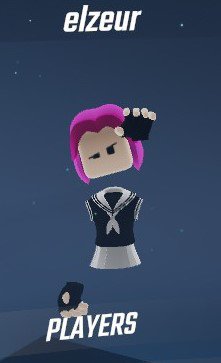
  <img src="/assets/images/beat-saber-wave.width-400.jpg" alt="beat-saber-wave.jpg" loading="lazy" />
  <figcaption>A fellow player waves hello when they join.</figcaption>
  
</figure>

<p>I’ve been a virtual reality enthusiast for many years, since it became a buzzword during the early 1990s. I saw <a href="https://en.wikipedia.org/wiki/The_Lawnmower_Man_(film)">Lawnmower Man</a> in the theater, and was a part of early virtual communities such as <a href="https://en.wikipedia.org/wiki/Active_Worlds">ActiveWorlds</a>. I had fifteen minutes of internet fame when I became the first person to <a href="http://www.mtv.com/news/1521239/finally-you-can-buy-something-real-with-play-money/">successfully sell real world items (video cards and monitors) for a game currency</a>.</p>

<p><a href="https://en.wikipedia.org/wiki/Second_Life">Second Life</a> was such an amazing place to be when it started; it was the ultimate blank canvas for dreamers. You could build and collaborate in real time, and there was this sense that we were all pieces of this shared artwork that was constantly in motion. Back in 2003, most of the regulars knew each other, like a small town, with the friendships and rivalries that came with it.</p>

<p>After many enjoyable years being heavily involved in Second Life, I took some time away. I got very involved in the Python and Django communities, got sober, and rediscovered my love for all things coding. When the latest wave of virtual reality headsets started to appear, such as the original Oculus and HTC Vive, I was a bit skeptical. But the technology had finally start to catch up to the dream of immersion. After my friend <a href="https://twitter.com/saronyitbarek">Saron Itbarek</a> had me over with some friends during a visit to San Diego, the assembled party tried out her HTC Vive, many being immersed for the first time. After some sage-like advice from her partner Robert, I got my own HTC Vive, and a few months later, I found I was using it enough to warrant purchasing a Valve Index.</p>

<figure class="figure figure-center">
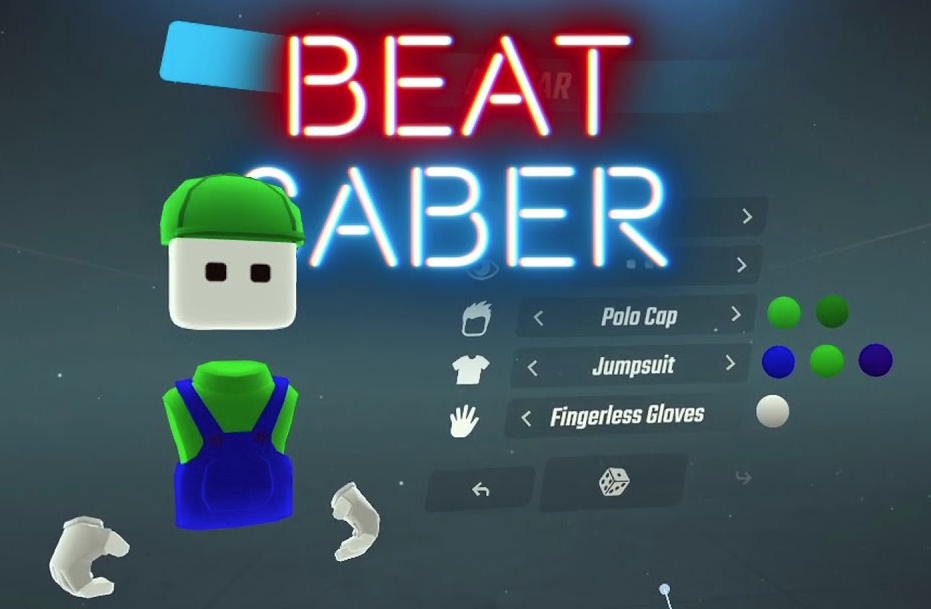
  <img src="/assets/images/beat-saber-4.original.png" alt="Beat Saber Avatar" loading="lazy" />
  <figcaption>The Beat Saber avatar creation interface.</figcaption>
  
</figure>

<p>I was never taken by rhythm games like Dance Dance Revolution or Guitar Hero in the past, but Beat Saber has not only become what I spend most of my virtual reality time doing, it is my exercise routine. It has me in the best shape of my life. I do about thirty minutes of intense mixed cardio every morning.</p>

<p>Recently, Beat Saber introduced an online head-to-head mode, where up to five players can play head-to-head with the same song. It may be by complete accident, but it seems like they may have made the friendliest online community I have ever been a part of:</p>

<ul>
  <li>All players can create avatars and have a name.</li>
  <li>Players can gesture with their hands, and you can see their heads move as well.</li>
  <li>There is no voice interaction.</li>
  <li>There is no chat window.</li>
</ul>

<figure class="figure figure-center">
  <img src="/assets/images/beat-saber-2.original.png" alt="Beat Saber Multiplayer in action" loading="lazy" />
  <figcaption>Multiplayer in action; you can see the person in the lead above the rest.</figcaption>
  
</figure>

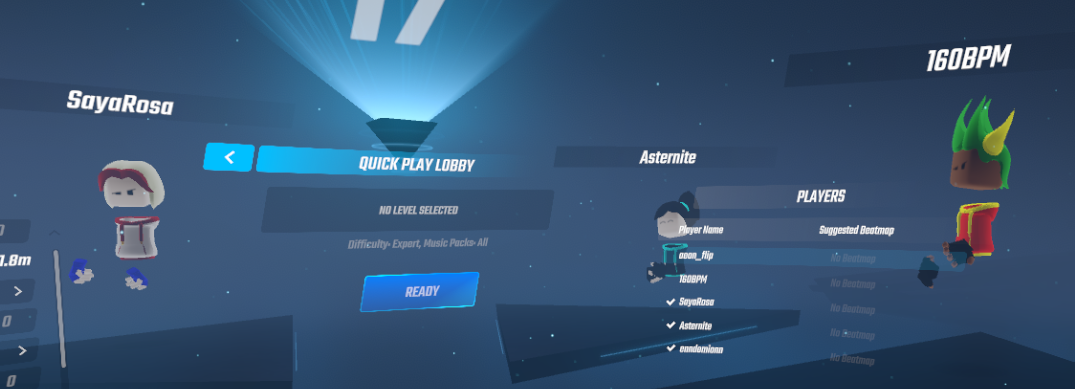
<p>This has led to a rich language of gestures evolving: players enthusiastically wave hello when a new player joins the game. It is common to see people clapping to the person who won the round, and the winner graciously taking a “namaste” bow. People wave goodbye, and gesture up to the center board in between songs to encourage a newcomer to select the song they would like to play next.</p>

<p>It is incredibly friendly and warm. Has Beat Saber accidentally stumbled on a wonderful way for us to communicate in games? There’s zero moderation necessary, and a language has started to evolve which brings no stress or drama, only positive emotions. It has been heartening to see.</p>

<figure class="figure figure-center">
  <img src="/assets/images/beat-saber-1.original.png" alt="Beat Saber Players" loading="lazy" />
  <figcaption>A group of players in between songs.</figcaption>
  
</figure>]]></content><author><name>Timothy Allen</name></author><category term="Virtual Reality" /><summary type="html"><![CDATA[Beat Saber's online play feature may have had a "happy accident", and created an incredibly friendly online community.]]></summary></entry><entry><title type="html">My Family Cheese Bread Recipe</title><link href="https://flipperpa.github.io/my-family-cheese-bread-recipe/" rel="alternate" type="text/html" title="My Family Cheese Bread Recipe" /><published>2020-12-30T14:22:00+00:00</published><updated>2020-12-30T14:22:00+00:00</updated><id>https://flipperpa.github.io/my-family-cheese-bread-recipe</id><content type="html" xml:base="https://flipperpa.github.io/my-family-cheese-bread-recipe/"><![CDATA[<h2 id="ingredients">Ingredients</h2>

<ul>
  <li><a href="https://smile.amazon.com/gp/product/B01BLEHWS6/">Two bread pans, about 9” x 5”</a> and <a href="https://smile.amazon.com/gp/product/B00091PNTI/">cooling trays</a></li>
  <li>1.5 ounces of active dry yeast</li>
  <li>16 ounces extra sharp cheddar cheese (I prefer orange to give the bread color!)</li>
  <li>Seven to nine cups of all-purpose flour</li>
  <li>Slightly less than a half teaspoon of salt</li>
  <li>Less than a tablespoon of sugar</li>
  <li>3 tablespoons of vegetable oil</li>
</ul>

<figure class="figure figure-center">
  <img src="/assets/images/cheese-bread-sliced.original.jpg" alt="cheese-bread-sliced.jpg" loading="lazy" />
  <figcaption>The finished product. Makes amazing grilled cheese!</figcaption>
  
</figure>

<ul>
  <li>Add packets of yeast to half a cup of “warm to the touch” water</li>
  <li>Sprinkle enough sugar on top of the yeast to cover it and start it bubbling - between a teaspoon and a tablespoon of sugar</li>
  <li>Grate the 16 ounces of cheese while sugar bubbles in with yeast</li>
  <li>Put cheese in a mixing bowl and add less than half a teaspoon of salt</li>
  <li>Wait for water/yeast/sugar mix to look mushy; by the time you’ve finished shredding the cheese, it should be mostly ready.</li>
  <li>Add 2 cups of hot water (very hot but not boiling - like a hot shower)</li>
  <li>Give a quick stir, add yeast mix, and re-stir</li>
  <li>Add six cups of flour, two cups at a time.
    <ul>
      <li>Stir it together</li>
      <li>Before dumping to the counter, prepare a measuring cup with three to four cups of flour. You won’t use it all, but need easy access as your hands are about to get really messy!</li>
      <li>After six cups, dump the entire mix to the counter from the bowl.</li>
    </ul>
  </li>
  <li>Continue to add flour by feel, up to about nine cups in winter, or seven in summer.</li>
  <li>Fine tune the mix together after six cups. It tastes cheesier the less flour you use.</li>
  <li>After it’s all mixed into a nice ball the size of a volleyball, add it back to the mixing bowl.</li>
  <li>Add one to two teaspoons of vegetable oil on one side of the ball - spread it around, and use enough to cover it. Turn the ball over and do the same to the other side.</li>
  <li>Fold a hand towel in half and put it over the mixing bowl. Let it rise for about 30 minutes, until the ball is pushing up on the towel.</li>
  <li>Take the risen ball out of the bowl, re-knead it to get all the air bubbles out (or you’ll have holey bread!)</li>
  <li>Spray the bread pans with Pam, especially the corners.</li>
  <li>Split the ball into two and put it in the pans, cover the pans to let it rise again.</li>
  <li>Pre-heat oven to 350, and let the mix rise to top of pans (about 20 to 30 minutes)</li>
  <li>Put in the lower half of the oven for 30 to 40 minutes</li>
  <li>Using two pot holders, check the bottom of the loaf to make sure it isn’t moist; when it is dry, the bread is done!</li>
  <li>Let it cool on a cooling tray, or eat it fresh out of the oven!</li>
</ul>]]></content><author><name>Timothy Allen</name></author><category term="How-To" /><category term="Random" /><summary type="html"><![CDATA[My mom's cheesebread is incredibly popular with everyone who has tasted it. A conversation with friends on Twitter inspired me to post it here.]]></summary></entry><entry><title type="html">Know Thy User: Custom User Models With django-allauth</title><link href="https://flipperpa.github.io/know-thy-user-custom-user-models-django-allauth/" rel="alternate" type="text/html" title="Know Thy User: Custom User Models With django-allauth" /><published>2020-10-16T20:54:00+00:00</published><updated>2020-10-16T20:54:00+00:00</updated><id>https://flipperpa.github.io/know-thy-user-custom-user-models-django-allauth</id><content type="html" xml:base="https://flipperpa.github.io/know-thy-user-custom-user-models-django-allauth/"><![CDATA[<h2 id="background">Background</h2>

<p>Let’s face it: <strong>managing users is likely the most important core aspect of any web project</strong>. It isn’t easy, and one size does not fit all. It might be tempting to overlook this architecture, or kick the can down the road, but it is one element where I have seen many projects pay the price for not planning up front.</p>

<p>Just over the past few weeks, <a href="https://twitter.com/pystar/status/1317159069929607168">I’ve had conversations with several friends</a> who considered using Django’s out-of-the-box <code class="language-plaintext highlighter-rouge">django.contrib.auth</code> User model. This should be avoided, <a href="https://docs.djangoproject.com/en/3.1/topics/auth/customizing/#using-a-custom-user-model-when-starting-a-project">and it even says so in Django’s documentation</a>. So how do you do it right? While there is no singular perfect solution, there is a flexible way of getting started, which I will outline here.</p>

<p>I’m a big fan of the <code class="language-plaintext highlighter-rouge">django-allauth</code> package, and recommend using it in conjunction with a custom Django users model. If you want a fuller understanding of Django custom user model options, <a href="https://testdriven.io/blog/django-custom-user-model/">please see this excellent article</a>.</p>

<h2 id="our-example-users-app">Our Example users App</h2>

<p>For this example, let’s assume we are doing the more complex task outlined in the article above.</p>

<ul>
  <li>We create an app called <code class="language-plaintext highlighter-rouge">users</code> with a model called <code class="language-plaintext highlighter-rouge">User</code></li>
  <li>User subclasses <code class="language-plaintext highlighter-rouge">AbstractBaseUser</code>, using the <code class="language-plaintext highlighter-rouge">email</code> field as the username</li>
  <li>Users may login with a local email and password combination, or by using Facebook, Twitter, or Google’s third party authorization options.</li>
</ul>

<p>Here’s an example of how our <code class="language-plaintext highlighter-rouge">users/models.py</code> might look like.</p>

<div class="language-python highlighter-rouge"><div class="highlight"><pre class="highlight"><code><span class="kn">from</span> <span class="nn">django.contrib.auth.models</span> <span class="kn">import</span> <span class="p">(</span>
    <span class="n">BaseUserManager</span><span class="p">,</span> <span class="n">AbstractBaseUser</span><span class="p">,</span> <span class="n">PermissionsMixin</span>
<span class="p">)</span>
<span class="kn">from</span> <span class="nn">django.db</span> <span class="kn">import</span> <span class="n">models</span>


<span class="k">class</span> <span class="nc">UserManager</span><span class="p">(</span><span class="n">BaseUserManager</span><span class="p">):</span>
    <span class="k">def</span> <span class="nf">create_user</span><span class="p">(</span><span class="bp">self</span><span class="p">,</span> <span class="n">email</span><span class="p">,</span> <span class="n">password</span><span class="o">=</span><span class="bp">None</span><span class="p">):</span>
        <span class="k">if</span> <span class="ow">not</span> <span class="n">email</span><span class="p">:</span>
            <span class="k">raise</span> <span class="nb">ValueError</span><span class="p">(</span><span class="s">"Users must have an email address."</span><span class="p">)</span>

        <span class="n">user</span> <span class="o">=</span> <span class="bp">self</span><span class="p">.</span><span class="n">model</span><span class="p">(</span><span class="n">email</span><span class="o">=</span><span class="bp">self</span><span class="p">.</span><span class="n">normalize_email</span><span class="p">(</span><span class="n">email</span><span class="p">))</span>
        <span class="n">user</span><span class="p">.</span><span class="n">set_password</span><span class="p">(</span><span class="n">password</span><span class="p">)</span>
        <span class="n">user</span><span class="p">.</span><span class="n">save</span><span class="p">(</span><span class="n">using</span><span class="o">=</span><span class="bp">self</span><span class="p">.</span><span class="n">_db</span><span class="p">)</span>

        <span class="k">return</span> <span class="n">user</span>

    <span class="k">def</span> <span class="nf">create_superuser</span><span class="p">(</span><span class="bp">self</span><span class="p">,</span> <span class="n">email</span><span class="p">,</span> <span class="n">password</span><span class="p">):</span>
        <span class="n">user</span> <span class="o">=</span> <span class="bp">self</span><span class="p">.</span><span class="n">create_user</span><span class="p">(</span><span class="n">email</span><span class="p">,</span><span class="n">password</span><span class="o">=</span><span class="n">password</span><span class="p">)</span>
        <span class="n">user</span><span class="p">.</span><span class="n">is_superuser</span> <span class="o">=</span> <span class="bp">True</span>
        <span class="n">user</span><span class="p">.</span><span class="n">is_staff</span> <span class="o">=</span> <span class="bp">True</span>
        <span class="n">user</span><span class="p">.</span><span class="n">save</span><span class="p">(</span><span class="n">using</span><span class="o">=</span><span class="bp">self</span><span class="p">.</span><span class="n">_db</span><span class="p">)</span>

        <span class="k">return</span> <span class="n">user</span>


<span class="k">class</span> <span class="nc">User</span><span class="p">(</span><span class="n">AbstractBaseUser</span><span class="p">,</span> <span class="n">PermissionsMixin</span><span class="p">):</span>
    <span class="n">email</span> <span class="o">=</span> <span class="n">models</span><span class="p">.</span><span class="n">EmailField</span><span class="p">(</span>
        <span class="n">verbose_name</span><span class="o">=</span><span class="s">'email address'</span><span class="p">,</span>
        <span class="n">unique</span><span class="o">=</span><span class="bp">True</span><span class="p">,</span>
        <span class="n">db_index</span><span class="o">=</span><span class="bp">True</span><span class="p">,</span>
    <span class="p">)</span>
    <span class="n">full_name</span> <span class="o">=</span> <span class="n">models</span><span class="p">.</span><span class="n">CharField</span><span class="p">(</span>
        <span class="n">max_length</span><span class="o">=</span><span class="mi">191</span><span class="p">,</span>
        <span class="n">blank</span><span class="o">=</span><span class="bp">True</span><span class="p">,</span>
    <span class="p">)</span>
    <span class="n">short_name</span> <span class="o">=</span> <span class="n">models</span><span class="p">.</span><span class="n">CharField</span><span class="p">(</span>
        <span class="n">max_length</span><span class="o">=</span><span class="mi">191</span><span class="p">,</span>
        <span class="n">blank</span><span class="o">=</span><span class="bp">True</span><span class="p">,</span>
    <span class="p">)</span>
    <span class="n">is_active</span> <span class="o">=</span> <span class="n">models</span><span class="p">.</span><span class="n">BooleanField</span><span class="p">(</span><span class="n">default</span><span class="o">=</span><span class="bp">True</span><span class="p">)</span>
    <span class="n">is_staff</span> <span class="o">=</span> <span class="n">models</span><span class="p">.</span><span class="n">BooleanField</span><span class="p">(</span><span class="n">default</span><span class="o">=</span><span class="bp">False</span><span class="p">)</span>

    <span class="n">objects</span> <span class="o">=</span> <span class="n">UserManager</span><span class="p">()</span>

    <span class="n">USERNAME_FIELD</span> <span class="o">=</span> <span class="s">"email"</span>

    <span class="k">def</span> <span class="nf">get_full_name</span><span class="p">(</span><span class="bp">self</span><span class="p">):</span>
        <span class="k">return</span> <span class="bp">self</span><span class="p">.</span><span class="n">full_name</span>

    <span class="k">def</span> <span class="nf">get_short_name</span><span class="p">(</span><span class="bp">self</span><span class="p">):</span>
        <span class="k">return</span> <span class="bp">self</span><span class="p">.</span><span class="n">short_name</span>

    <span class="k">def</span> <span class="nf">__str__</span><span class="p">(</span><span class="bp">self</span><span class="p">):</span>
        <span class="k">return</span> <span class="sa">f</span><span class="s">"</span><span class="si">{</span><span class="bp">self</span><span class="p">.</span><span class="n">email</span><span class="si">}</span><span class="s"> (</span><span class="si">{</span><span class="bp">self</span><span class="p">.</span><span class="n">full_name</span><span class="si">}</span><span class="s">)"</span>
</code></pre></div></div>

<h2 id="modifying-our-settings">Modifying Our Settings</h2>

<p>First, we need to wire up <code class="language-plaintext highlighter-rouge">django-allauth</code> to our Django project.</p>

<div class="language-python highlighter-rouge"><div class="highlight"><pre class="highlight"><code><span class="n">AUTH_APPS</span> <span class="o">=</span> <span class="p">[</span>
    <span class="s">"django.contrib.sites"</span><span class="p">,</span>
    <span class="s">"allauth"</span><span class="p">,</span>
    <span class="s">"allauth.account"</span><span class="p">,</span>
    <span class="s">"allauth.socialaccount"</span><span class="p">,</span>
    <span class="s">"allauth.socialaccount.providers.facebook"</span><span class="p">,</span>
    <span class="s">"allauth.socialaccount.providers.google"</span><span class="p">,</span>
    <span class="s">"allauth.socialaccount.providers.twitter"</span><span class="p">,</span>
<span class="p">]</span>

<span class="n">SITE_ID</span> <span class="o">=</span> <span class="mi">1</span>

<span class="n">INSTALLED_APPS</span> <span class="o">+=</span> <span class="n">AUTH_APPS</span>

<span class="n">AUTH_USER_MODEL</span> <span class="o">=</span> <span class="s">"users.User"</span>

<span class="n">AUTHENTICATION_BACKENDS</span> <span class="o">=</span> <span class="p">[</span>
    <span class="s">"django.contrib.auth.backends.ModelBackend"</span><span class="p">,</span>
    <span class="s">"allauth.account.auth_backends.AuthenticationBackend"</span><span class="p">,</span>
<span class="p">]</span>
</code></pre></div></div>

<p>Then we have to tell <code class="language-plaintext highlighter-rouge">django-allauth</code> how we’ve set up our custom user model. These settings allow us to use the <code class="language-plaintext highlighter-rouge">email</code> field as in lieu of the username, and use the <code class="language-plaintext highlighter-rouge">email</code> received from the third party auth systems as such.</p>

<div class="language-python highlighter-rouge"><div class="highlight"><pre class="highlight"><code><span class="c1"># Settings for email as username
</span><span class="n">ACCOUNT_EMAIL_REQUIRED</span> <span class="o">=</span> <span class="bp">True</span>
<span class="n">ACCOUNT_UNIQUE_EMAIL</span> <span class="o">=</span> <span class="bp">True</span>
<span class="n">ACCOUNT_AUTHENTICATION_METHOD</span> <span class="o">=</span> <span class="s">"email"</span>
<span class="n">ACCOUNT_USERNAME_REQUIRED</span> <span class="o">=</span> <span class="bp">False</span>
<span class="n">ACCOUNT_USER_MODEL_USERNAME_FIELD</span> <span class="o">=</span> <span class="bp">None</span>
</code></pre></div></div>

<p>This has the added advantage of avoiding users creating duplicate accounts. If someone tries to create an account with Twitter, but they already have an account with us with the email address that Twitter provides, they will receive a message reminding them they already have an account. They can then login to the website, and associate their Twitter account with their existing account, if they wish.</p>

<p>Here are some other settings I find useful from <code class="language-plaintext highlighter-rouge">django-allauth</code>:</p>

<div class="language-python highlighter-rouge"><div class="highlight"><pre class="highlight"><code><span class="c1"># Email confirmation
</span><span class="n">ACCOUNT_EMAIL_SUBJECT_PREFIX</span> <span class="o">=</span> <span class="s">"[My Website]"</span>
<span class="n">ACCOUNT_LOGIN_ON_EMAIL_CONFIRMATION</span> <span class="o">=</span> <span class="bp">True</span>

<span class="c1"># After 10 failed login attempts, restrict logins for 30 minutes
</span><span class="n">ACCOUNT_LOGIN_ATTEMPTS_LIMIT</span> <span class="o">=</span> <span class="mi">10</span>
<span class="n">ACCOUNT_LOGIN_ATTEMPTS_TIMEOUT</span> <span class="o">=</span> <span class="mi">1800</span>
<span class="n">ACCOUNT_PASSWORD_MIN_LENGTH</span> <span class="o">=</span> <span class="mi">12</span>

<span class="c1"># Other settings
</span><span class="n">ACCOUNT_DEFAULT_HTTP_PROTOCOL</span> <span class="o">=</span> <span class="s">"https"</span>
<span class="n">ACCOUNT_LOGIN_ON_PASSWORD_RESET</span> <span class="o">=</span> <span class="bp">True</span>
<span class="n">SOCIALACCOUNT_AUTO_SIGNUP</span> <span class="o">=</span> <span class="bp">False</span>
</code></pre></div></div>

<p><a href="https://django-allauth.readthedocs.io/en/latest/configuration.html">There are many <code class="language-plaintext highlighter-rouge">django-allauth</code> settings which can be reviewed to tailor your user experience</a>. I recommend reviewing them.</p>

<p>I haven’t gone into the details of how to set up the third-party providers. There is <a href="http://www.sarahhagstrom.com/2013/09/the-missing-django-allauth-tutorial/#Create_and_configure_a_Facebook_app">an excellent tutorial on adding Facebook</a>, and the process is similar for all third party providers.</p>

<p>I hope this walk-through helps get folks off on the right foot. This stuff isn’t easy, but it is very important to get right, at the beginning of a project. I’ve found these settings over many years with several different projects, and hope that experience saves some time for others. Good luck!</p>]]></content><author><name>Timothy Allen</name></author><category term="Python" /><category term="Django" /><category term="How-To" /><summary type="html"><![CDATA[ALWAYS use a custom Django user model when starting a project. This is one of the best up-front investments of time that I know of in creating Django projects. Every time I haven't taken the time to do this the right way up front, I have regretted it. Every. Time.]]></summary></entry><entry><title type="html">Dreamscape: A Dark, High-Contrast, Very Purple Theme for VSCode</title><link href="https://flipperpa.github.io/dreamscape-dark-high-contrast-very-purple-theme-vscode/" rel="alternate" type="text/html" title="Dreamscape: A Dark, High-Contrast, Very Purple Theme for VSCode" /><published>2020-08-03T14:20:00+00:00</published><updated>2020-08-03T14:20:00+00:00</updated><id>https://flipperpa.github.io/dreamscape-dark-high-contrast-very-purple-theme-vscode</id><content type="html" xml:base="https://flipperpa.github.io/dreamscape-dark-high-contrast-very-purple-theme-vscode/"><![CDATA[<p><a href="https://marketplace.visualstudio.com/items?itemName=FlipperPA.theme-dreamscape"><strong>You can download the theme here.</strong></a></p>

<figure class="figure figure-center">
  <img src="/assets/images/vscode-theme-dreamscape.original.png" alt="VSCode Theme: Dreamscape" loading="lazy" />
  <figcaption>My new VSCode Theme, 'Dreamscape.'</figcaption>
  
</figure>]]></content><author><name>Timothy Allen</name></author><category term="Random" /><summary type="html"><![CDATA[I designed my first theme for VSCode. Download it if you love purple as much as me!]]></summary></entry><entry><title type="html">My Latest VSCode Setup</title><link href="https://flipperpa.github.io/my-latest-vscode-setup/" rel="alternate" type="text/html" title="My Latest VSCode Setup" /><published>2020-08-01T15:48:00+00:00</published><updated>2020-08-01T15:48:00+00:00</updated><id>https://flipperpa.github.io/my-latest-vscode-setup</id><content type="html" xml:base="https://flipperpa.github.io/my-latest-vscode-setup/"><![CDATA[<h2 id="video-on-my-path-to-vscode">Video on My Path to VSCode</h2>

<p>I’ve used a lot of editors over the years. Here’s a presentation for co-workers on how I ended up a VSCode enthusiast. If you’d like to learn why I love VSCode so much, check this out.</p>

<div class="video">
  <iframe src="https://www.youtube-nocookie.com/embed/A6W187xNw1c" title="YouTube video" loading="lazy" allow="accelerometer; clipboard-write; encrypted-media; gyroscope; picture-in-picture; fullscreen" referrerpolicy="strict-origin-when-cross-origin" allowfullscreen=""></iframe>
</div>

<h2 id="current-extensions">Current Extensions</h2>

<ul>
  <li>Remote Development (ms-vscode-remote.vscode-remote-extensionpack): <a href="https://marketplace.visualstudio.com/items?itemName=ms-vscode-remote.vscode-remote-extensionpack">https://marketplace.visualstudio.com/items?itemName=ms-vscode-remote.vscode-remote-extensionpack</a></li>
  <li>GitLens (eamodio.gitlens): <a href="https://marketplace.visualstudio.com/items?itemName=ms-vscode-remote.vscode-remote-extensionpack">https://marketplace.visualstudio.com/items?itemName=eamodio.gitlens</a></li>
  <li>GitHistory (donjayamanne.githistory): <a href="https://marketplace.visualstudio.com/items?itemName=ms-vscode-remote.vscode-remote-extensionpack">https://marketplace.visualstudio.com/items?itemName=donjayamanne.githistory</a></li>
  <li>Python (ms-python.python): <a href="https://marketplace.visualstudio.com/items?itemName=ms-vscode-remote.vscode-remote-extensionpack">https://marketplace.visualstudio.com/items?itemName=ms-python.python</a></li>
  <li>Django Templates (batisteo.vscode-django): <a href="https://marketplace.visualstudio.com/items?itemName=batisteo.vscode-django">https://marketplace.visualstudio.com/items?itemName=batisteo.vscode-django</a></li>
  <li>Beautify (hookyqr.beautify): <a href="https://marketplace.visualstudio.com/items?hookyqr.beautify">https://marketplace.visualstudio.com/items?hookyqr.beautify</a></li>
  <li>ESLint (dbaeumer.vscode-eslint): <a href="https://marketplace.visualstudio.com/items?dbaeumer.vscode-eslint">https://marketplace.visualstudio.com/items?dbaeumer.vscode-eslint</a></li>
</ul>

<h2 id="an-example-vscodesettingsjson">An Example “.vscode/settings.json”</h2>

<div class="language-json highlighter-rouge"><div class="highlight"><pre class="highlight"><code><span class="p">{</span><span class="w">
    </span><span class="nl">"[python]"</span><span class="p">:</span><span class="w"> </span><span class="p">{</span><span class="w">
        </span><span class="nl">"editor.rulers"</span><span class="p">:</span><span class="w"> </span><span class="p">[</span><span class="w">
            </span><span class="mi">88</span><span class="w">
        </span><span class="p">],</span><span class="w">
        </span><span class="nl">"editor.formatOnSave"</span><span class="p">:</span><span class="w"> </span><span class="kc">false</span><span class="p">,</span><span class="w">
    </span><span class="p">},</span><span class="w">
    </span><span class="nl">"python.pythonPath"</span><span class="p">:</span><span class="w"> </span><span class="s2">"/home/username/.venvs/your-venv/bin/python3"</span><span class="p">,</span><span class="w">
    </span><span class="nl">"python.formatting.provider"</span><span class="p">:</span><span class="w"> </span><span class="s2">"black"</span><span class="p">,</span><span class="w">
    </span><span class="nl">"python.linting.enabled"</span><span class="p">:</span><span class="w"> </span><span class="kc">true</span><span class="p">,</span><span class="w">
    </span><span class="nl">"python.linting.pylintEnabled"</span><span class="p">:</span><span class="w"> </span><span class="kc">false</span><span class="p">,</span><span class="w">
    </span><span class="nl">"python.linting.flake8Enabled"</span><span class="p">:</span><span class="w"> </span><span class="kc">true</span><span class="p">,</span><span class="w">
    </span><span class="nl">"python.linting.flake8Args"</span><span class="p">:</span><span class="w"> </span><span class="p">[</span><span class="w">
        </span><span class="s2">"--ignore=E203,E231,E309,E501,W503"</span><span class="p">,</span><span class="w">
        </span><span class="s2">"--max-line-length=88"</span><span class="p">,</span><span class="w">
        </span><span class="s2">"--verbose"</span><span class="w">
    </span><span class="p">],</span><span class="w">
    </span><span class="nl">"editor.wordWrapColumn"</span><span class="p">:</span><span class="w"> </span><span class="mi">88</span><span class="p">,</span><span class="w">
    </span><span class="nl">"files.associations"</span><span class="p">:</span><span class="w"> </span><span class="p">{</span><span class="w">
        </span><span class="nl">"**/*.html"</span><span class="p">:</span><span class="w"> </span><span class="s2">"html"</span><span class="p">,</span><span class="w">
        </span><span class="nl">"**/templates/**/*.html"</span><span class="p">:</span><span class="w"> </span><span class="s2">"django-html"</span><span class="p">,</span><span class="w">
        </span><span class="nl">"**/templates/**/*"</span><span class="p">:</span><span class="w"> </span><span class="s2">"django-txt"</span><span class="p">,</span><span class="w">
        </span><span class="nl">"**/requirements{/**,*}.{txt,in}"</span><span class="p">:</span><span class="w"> </span><span class="s2">"pip-requirements"</span><span class="w">
    </span><span class="p">},</span><span class="w">
</span><span class="p">}</span><span class="w">
</span></code></pre></div></div>

<h2 id="an-example-vscodelaunchjson">An Example “.vscode/launch.json”</h2>

<p>You can find details about <a href="https://code.visualstudio.com/docs/python/tutorial-django#_create-a-debugger-launch-profile"><strong>creating a debugger launch profile here</strong></a>; below is an example of the one I use.</p>

<div class="language-json highlighter-rouge"><div class="highlight"><pre class="highlight"><code><span class="p">{</span><span class="w">
    </span><span class="err">//</span><span class="w"> </span><span class="err">Use</span><span class="w"> </span><span class="err">IntelliSense</span><span class="w"> </span><span class="err">to</span><span class="w"> </span><span class="err">learn</span><span class="w"> </span><span class="err">about</span><span class="w"> </span><span class="err">possible</span><span class="w"> </span><span class="err">attributes.</span><span class="w">
    </span><span class="err">//</span><span class="w"> </span><span class="err">Hover</span><span class="w"> </span><span class="err">to</span><span class="w"> </span><span class="err">view</span><span class="w"> </span><span class="err">descriptions</span><span class="w"> </span><span class="err">of</span><span class="w"> </span><span class="err">existing</span><span class="w"> </span><span class="err">attributes.</span><span class="w">
    </span><span class="err">//</span><span class="w"> </span><span class="err">For</span><span class="w"> </span><span class="err">more</span><span class="w"> </span><span class="err">information</span><span class="p">,</span><span class="w"> </span><span class="err">visit:</span><span class="w"> </span><span class="err">https://go.microsoft.com/fwlink/?linkid=</span><span class="mi">830387</span><span class="w">
    </span><span class="nl">"version"</span><span class="p">:</span><span class="w"> </span><span class="s2">"0.2.0"</span><span class="p">,</span><span class="w">
    </span><span class="nl">"configurations"</span><span class="p">:</span><span class="w"> </span><span class="p">[</span><span class="w">
        </span><span class="p">{</span><span class="w">
            </span><span class="nl">"name"</span><span class="p">:</span><span class="w"> </span><span class="s2">"Python: Django"</span><span class="p">,</span><span class="w">
            </span><span class="nl">"type"</span><span class="p">:</span><span class="w"> </span><span class="s2">"python"</span><span class="p">,</span><span class="w">
            </span><span class="nl">"request"</span><span class="p">:</span><span class="w"> </span><span class="s2">"launch"</span><span class="p">,</span><span class="w">
            </span><span class="nl">"program"</span><span class="p">:</span><span class="w"> </span><span class="s2">"${workspaceFolder}/manage.py"</span><span class="p">,</span><span class="w">
            </span><span class="nl">"args"</span><span class="p">:</span><span class="w"> </span><span class="p">[</span><span class="w">
                </span><span class="s2">"runserver"</span><span class="p">,</span><span class="w">
                </span><span class="s2">"0:8000"</span><span class="p">,</span><span class="w">
            </span><span class="p">],</span><span class="w">
            </span><span class="nl">"django"</span><span class="p">:</span><span class="w"> </span><span class="kc">true</span><span class="w">
        </span><span class="p">}</span><span class="w">
    </span><span class="p">]</span><span class="w">
</span><span class="p">}</span><span class="w">
</span></code></pre></div></div>

<h2 id="fin">Fin.</h2>

<p>I hope this helps get you off any running with VSCode for your Python and Django development!</p>]]></content><author><name>Timothy Allen</name></author><category term="Python" /><category term="Django" /><category term="How-To" /><summary type="html"><![CDATA[My development environment is always evolving. Here's my latest/greatest setup.]]></summary></entry><entry><title type="html">Django and SQL Server: 2020 Edition</title><link href="https://flipperpa.github.io/django-and-sql-server-2020-edition/" rel="alternate" type="text/html" title="Django and SQL Server: 2020 Edition" /><published>2020-06-17T13:16:00+00:00</published><updated>2020-06-17T13:16:00+00:00</updated><id>https://flipperpa.github.io/django-and-sql-server-2020-edition</id><content type="html" xml:base="https://flipperpa.github.io/django-and-sql-server-2020-edition/"><![CDATA[<p>Getting Django to use SQL Server as a database backend requires third party tools and drivers. However, much of the information available on the web on the topic is quite out of date. I’ve been a contributor to several drivers and packages over the years, supporting SQL Server as a Django database backend for The Wharton School. Here’s how we do it; you can find Ansible roles and <a href="https://github.com/wharton/python-vagrant-centos7/">a working CentOS 7 Vagrant box here</a> with all the prerequisites installed (hint: look in <code class="language-plaintext highlighter-rouge">provisioning/roles/mssql</code>). Instructions below are for RedHat/CentOS 7, but links will be provided for SUSE, OS/X and Ubuntu as well.</p>

<p>You may have seen my previous posts on this topic, recommending <code class="language-plaintext highlighter-rouge">django-pyodbc-azure</code>; it is no longer maintained. We now use <code class="language-plaintext highlighter-rouge">django-mssql-backend</code>. Be sure to uninstall all remnants or <code class="language-plaintext highlighter-rouge">django-pyodbc-azure</code>; in fact, starting with a fresh virtual environment might be the best bet.</p>

<h2 id="step-1-install-the-microsoft-linux-odbc-driver">Step 1: Install the Microsoft Linux ODBC Driver</h2>

<p>You can also use FreeTDS, but at the time of this writing, <a href="https://docs.microsoft.com/en-us/sql/connect/odbc/linux-mac/installing-the-microsoft-odbc-driver-for-sql-server?view=sql-server-2017">I recommend using the Microsoft driver</a> (includes instructions for alternate distributions).</p>

<div class="language-bash highlighter-rouge"><div class="highlight"><pre class="highlight"><code><span class="nb">sudo </span>curl https://packages.microsoft.com/config/rhel/7/prod.repo <span class="o">&gt;</span> /etc/yum.repos.d/mssql-release.repo

<span class="nb">sudo </span>yum remove unixODBC-utf16 unixODBC-utf16-devel
<span class="nb">sudo </span><span class="nv">ACCEPT_EULA</span><span class="o">=</span>Y yum <span class="nb">install </span>msodbcsql17
</code></pre></div></div>

<h2 id="step-2-verify-the-installation">Step 2: Verify the Installation</h2>

<p>If everything worked, you should be able to verify the installation by viewing <code class="language-plaintext highlighter-rouge">/etc/odbcinst.ini</code>; it should have a section that looks something like this.</p>

<div class="language-bash highlighter-rouge"><div class="highlight"><pre class="highlight"><code><span class="o">[</span>ODBC Driver 17 <span class="k">for </span>SQL Server]
<span class="nv">Description</span><span class="o">=</span>Microsoft ODBC Driver 17 <span class="k">for </span>SQL Server
<span class="nv">Driver</span><span class="o">=</span>/opt/microsoft/msodbcsql17/lib64/libmsodbcsql-17.1.so.0.1
<span class="nv">UsageCount</span><span class="o">=</span>1
</code></pre></div></div>

<p>Take note of the section header of the file: <code class="language-plaintext highlighter-rouge">ODBC Driver 17 for SQL Server</code>. We will be using this later to reference the driver.</p>

<h2 id="step-3-setting-up-a-service-user-in-sql-server">Step 3: Setting Up a Service User in SQL Server</h2>

<p>For best security practices, I recommend setting up an individual user for each Django project you have. The following script will create a <code class="language-plaintext highlighter-rouge">DATABASE</code>, <code class="language-plaintext highlighter-rouge">LOGIN</code>, <code class="language-plaintext highlighter-rouge">USER</code> and <code class="language-plaintext highlighter-rouge">PASSWORD</code> in SQL Server with the minimum permissions needed for Django to run.</p>

<div class="language-bash highlighter-rouge"><div class="highlight"><pre class="highlight"><code>/<span class="k">*</span>
This Script Creates a SQL Server Database, Login and User
With Appropriate Permissions <span class="k">for </span>a Production Django Project
with migrations. Simply fill out the variables below <span class="o">(</span>@db_name and @db_password<span class="o">)</span>
Username will be <span class="nb">set </span>to database name + <span class="s1">'_user'</span> by default.
<span class="k">*</span>/
DECLARE @db_name VARCHAR<span class="o">(</span>MAX<span class="o">)</span> <span class="o">=</span> <span class="s1">'project'</span>
DECLARE @db_password VARCHAR<span class="o">(</span>MAX<span class="o">)</span> <span class="o">=</span> <span class="s1">'project_password'</span>
DECLARE @db_user VARCHAR<span class="o">(</span>MAX<span class="o">)</span> <span class="o">=</span> @db_name + <span class="s1">'_user'</span>
<span class="nt">--</span>
USE master
DECLARE @cmd VARCHAR<span class="o">(</span>MAX<span class="o">)</span>
<span class="nt">--</span> Server scope: create SQL Server login and permissions
SET @cmd <span class="o">=</span> <span class="s1">'CREATE LOGIN '</span> + @db_user + <span class="s1">' WITH PASSWORD = '''</span> + @db_password + <span class="s1">''''</span>
EXEC<span class="o">(</span>@cmd<span class="o">)</span>
SET @cmd <span class="o">=</span> <span class="s1">'GRANT VIEW SERVER STATE TO '</span> + @db_user
EXEC<span class="o">(</span>@cmd<span class="o">)</span>
SET @cmd <span class="o">=</span> <span class="s1">'CREATE DATABASE ['</span> + @db_name + <span class="s1">']'</span>
EXEC<span class="o">(</span>@cmd<span class="o">)</span>
<span class="nt">--</span> DB scope: create user <span class="k">for </span>server login and permissions
SET @cmd <span class="o">=</span> <span class="s1">'USE ['</span> + @db_name + <span class="s1">'];'</span>
SET @cmd <span class="o">=</span> @cmd + <span class="s1">'CREATE USER '</span> + @db_user + <span class="s1">' FOR LOGIN '</span> + @db_user + <span class="s1">';'</span>
SET @cmd <span class="o">=</span> @cmd + <span class="s1">'GRANT SELECT, INSERT, UPDATE, DELETE, ALTER, CREATE TABLE, REFERENCES, EXEC TO '</span> + @db_user
EXEC<span class="o">(</span>@cmd<span class="o">)</span>
</code></pre></div></div>

<h2 id="step-4-setting-up-django">Step 4: Setting up Django</h2>

<p>Fire up your virtual environment for your Django project. We’re going to install django-mssql-backend (which will install pyodbc as well).</p>

<div class="language-bash highlighter-rouge"><div class="highlight"><pre class="highlight"><code>pip <span class="nb">install </span>django-mssql-backend
</code></pre></div></div>

<p>Then, we modify our Django settings.</p>

<div class="language-python highlighter-rouge"><div class="highlight"><pre class="highlight"><code><span class="n">DATABASES</span> <span class="o">=</span> <span class="p">{</span>
    <span class="s">'default'</span><span class="p">:</span> <span class="p">{</span>
        <span class="s">'ENGINE'</span><span class="p">:</span> <span class="s">'sql_server.pyodbc'</span><span class="p">,</span>
        <span class="s">'HOST'</span><span class="p">:</span> <span class="s">'dbserver.your-domain.com'</span><span class="p">,</span>
        <span class="s">'PORT'</span><span class="p">:</span> <span class="s">'1433'</span><span class="p">,</span>
        <span class="s">'NAME'</span><span class="p">:</span> <span class="s">'project'</span><span class="p">,</span>
        <span class="s">'USER'</span><span class="p">:</span> <span class="s">'project_user'</span><span class="p">,</span>
        <span class="s">'PASSWORD'</span><span class="p">:</span> <span class="s">'project_password'</span><span class="p">,</span>
        <span class="s">'OPTIONS'</span><span class="p">:</span> <span class="p">{</span>
            <span class="s">'driver'</span><span class="p">:</span> <span class="s">'ODBC Driver 17 for SQL Server'</span><span class="p">,</span>
            <span class="s">'unicode_results'</span><span class="p">:</span> <span class="bp">True</span><span class="p">,</span>
        <span class="p">},</span>
    <span class="p">},</span>
<span class="p">}</span>
</code></pre></div></div>

<h2 id="step-5-run-initial-migrations">Step 5: Run Initial Migrations</h2>

<p>If everything has worked, you should now be able to run your initial migrations, and see Django’s initial tables in your SQL Server database. If you have any questions, there are a bunch of us who watch the <code class="language-plaintext highlighter-rouge">django-mssql-backend</code> tag on Stack Overflow and willing to help!</p>]]></content><author><name>Timothy Allen</name></author><category term="Python" /><category term="Django" /><category term="How-To" /><category term="Linux" /><category term="Database" /><summary type="html"><![CDATA[Django offers support for SQL Server through the third-party database engine, django-mssql-backend. Here's an end-to-end set of instructions for the best practices for installing it in 2020.]]></summary></entry><entry><title type="html">Presentation at CMS Philly 2020: “Wagtail: The Only CMS I Still Love After Years”</title><link href="https://flipperpa.github.io/presentation-cms-philly-2020-wagtail-only-cms-i-still-love-after-years/" rel="alternate" type="text/html" title="Presentation at CMS Philly 2020: “Wagtail: The Only CMS I Still Love After Years”" /><published>2020-05-19T00:24:00+00:00</published><updated>2020-05-19T00:24:00+00:00</updated><id>https://flipperpa.github.io/presentation-cms-philly-2020-wagtail-only-cms-i-still-love-after-years</id><content type="html" xml:base="https://flipperpa.github.io/presentation-cms-philly-2020-wagtail-only-cms-i-still-love-after-years/"><![CDATA[<div class="video">
  <iframe src="https://www.youtube-nocookie.com/embed/80UhUWX-oaE" title="YouTube video" loading="lazy" allow="accelerometer; clipboard-write; encrypted-media; gyroscope; picture-in-picture; fullscreen" referrerpolicy="strict-origin-when-cross-origin" allowfullscreen=""></iframe>
</div>

<p>Wagtail 1.0 was released five years ago, and since then, it has emerged as the most popular CMS for the Django web framework. Wagtail and Django are both written in Python, one of the most popular programming languages and ecosystems in the world. Django powers sites like Instagram, Pinterest, The Washington Post, and Wagtail is used by major players like the U.K.’s National Health System, Google’s blog, The Wharton School, several of NASA’s sites, and many more. Wagtail takes a different approach from most CMS’s: there’s no quick start installation, and you will need a developer. Wagtail challenges you to think of the shape and structure of your content up front, but is flexible enough to adapt as your content needs change.</p>

<p>Accessibility, user experience, search, and scalability aren’t afterthoughts in Wagtail: they are first order features. Wagtail also features a mobile friendly admin designed by content creators, a StreamField for structured authorship to avoid overloading a body field, and beautiful WYSIWYG called Draftail. Draftail stores all of its content in a JSON structured format rather than raw HTML, avoiding the many back-and-forth conversion problems prevalent in WYSIWYGs.</p>

<p>Tom will give an introduction to Wagtail, its philosophy, and why his Drupal shop decided to pivot from PHP to create a Python/Django based framework. Tim will show how it is being used to save lives here in Philadelphia, by powering our regional A.A. website.</p>]]></content><author><name>Timothy Allen</name></author><category term="Python" /><category term="Django" /><category term="Conferences &amp; Meetups" /><category term="Media &amp; Press" /><summary type="html"><![CDATA[Presented with Tom Dyson of Torchbox, creators of Wagtail.Most of us have had the experience of loving a CMS at first, but souring over time, as the limitations and shortcomings come to light. We have had this experience too many times during our careers, as both users and developers of content management systems. What if something better could be built, which would withstand the test of time, and still be loved after years?]]></summary></entry></feed>